





One Bot, Two Versions. Infinite Possibilities.
We’ve updated the bot to fully support Season 5 Zombies.
The game introduced a new layout, and the bot has been adjusted to match it so everything runs smoothly and accurately.
We understand how easy it is to fake online reviews — but not here. Our Discord review channel is open to the public, showing live and unedited customer experiences.
With LastWar Bot, you could be farming 5B+ Gold monthly from Gold Zombie events, collecting hundreds of Drone Parts weekly, and stacking Speedups, Diamonds, Stamina Scrolls, and countless other rewards — all completely hands-free.
Let the bot handle all the boring chores so you can focus on playing.
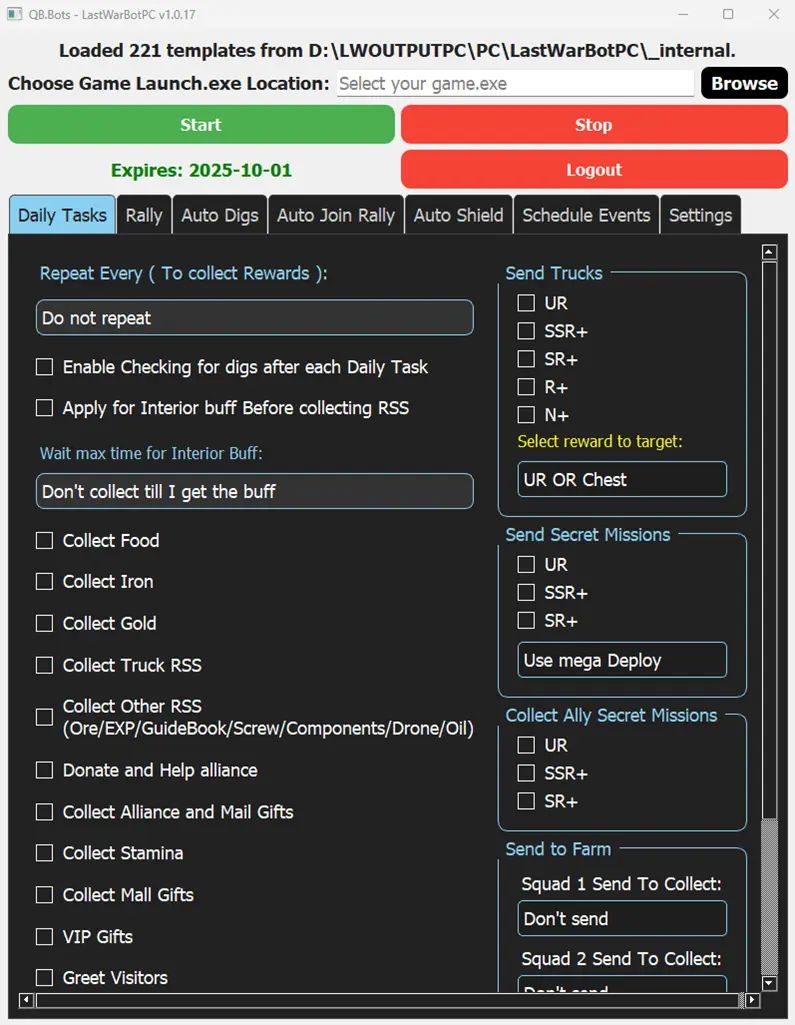
🏆 Completes all daily & secret missions
🎁 Collects every reward (VIP, stamina, mail gifts, free chests)
🚜 Sends all squads to farm automatically
🛡️ Applies buffs before resource collection
🤖 Smart decisions (reduces secret mission plundering)
⚙️ Fully customizable — check/uncheck what you want
Save hours every day — even with multiple accounts.
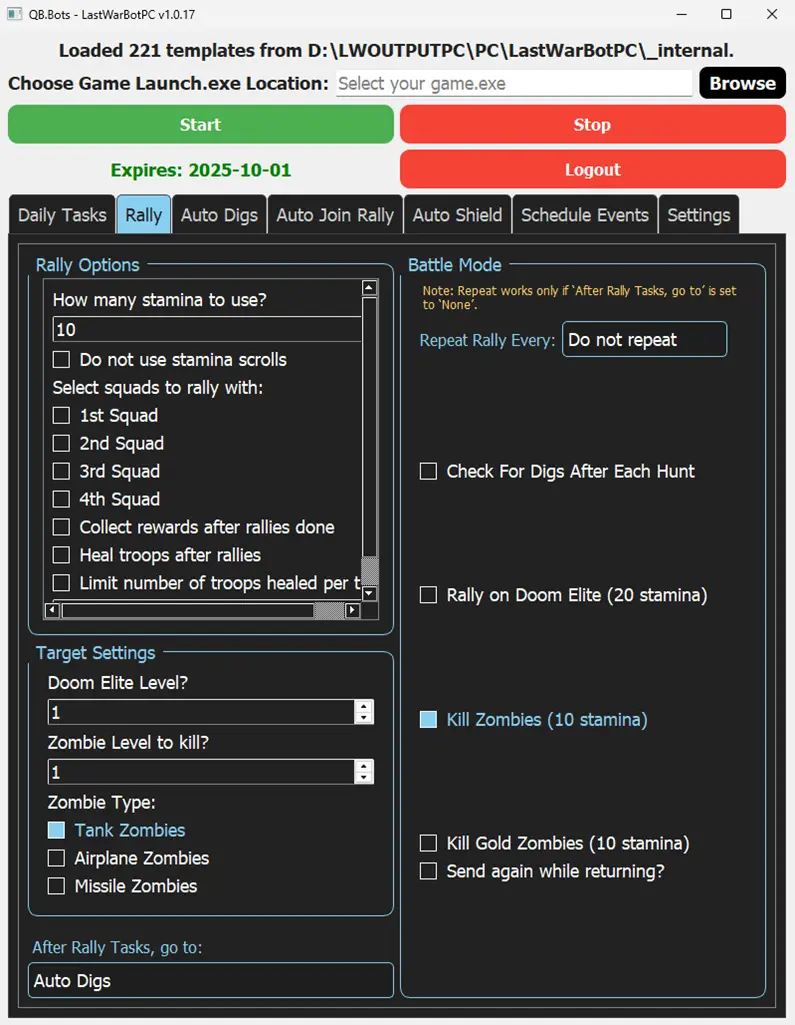
Turn stamina into rewards automatically — smarter, faster, nonstop.
🔋 Set how much stamina you want to spend
🎯 Choose which squads to send (1–4 squads)
🎁 Auto-collect rewards after every hunt
🩹 Auto-heals wounded troops before sending again
👾 Target exactly what you want: Doom Elites, Zombies, or Gold Zombies
📈 Define monster levels to hunt — the bot sticks to your settings
Maximize your rallies with zero effort while you play or even while you’re away.
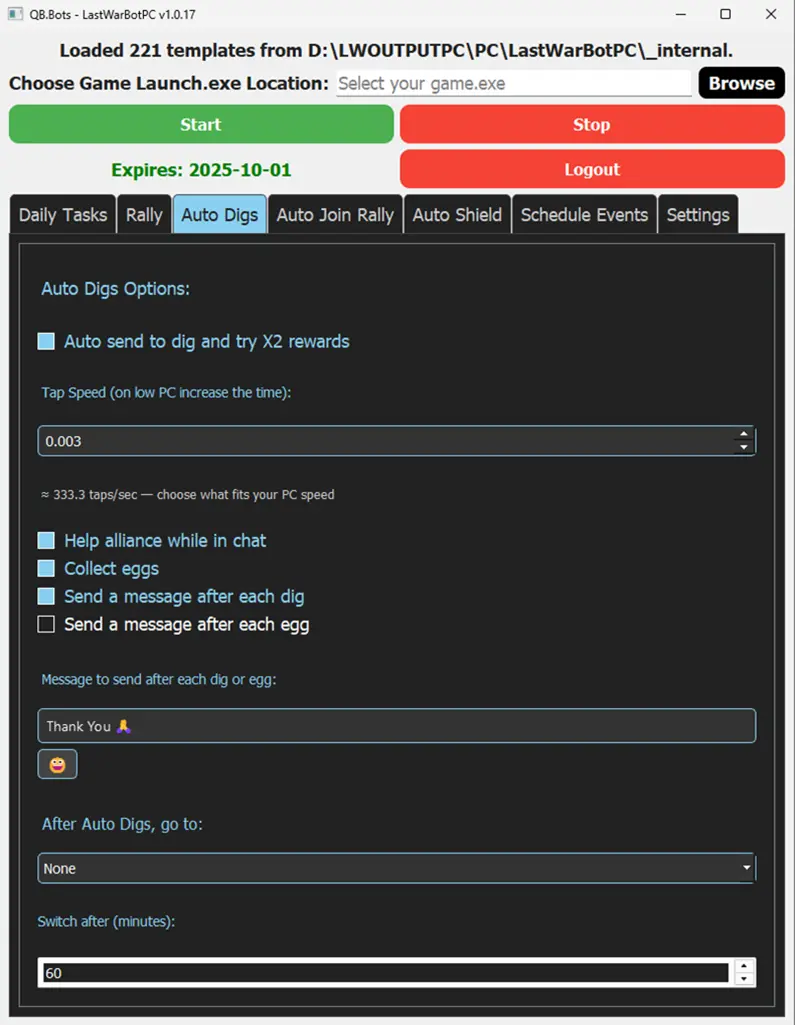
Never miss a dig — the bot finds them, completes them, and squeezes out extra rewards.
🚀 Auto-sends squads when a dig is found
🎁 Attempts double rewards at the end of each dig
🤝 Helps alliance members automatically
💎 Collects shared eggs for extra diamonds
💬 Sends a custom message after each dig or egg collection
⏱️ Control how long the bot keeps checking for digs/eggs before switching tasks
More digs, more rewards, less effort — all on autopilot.
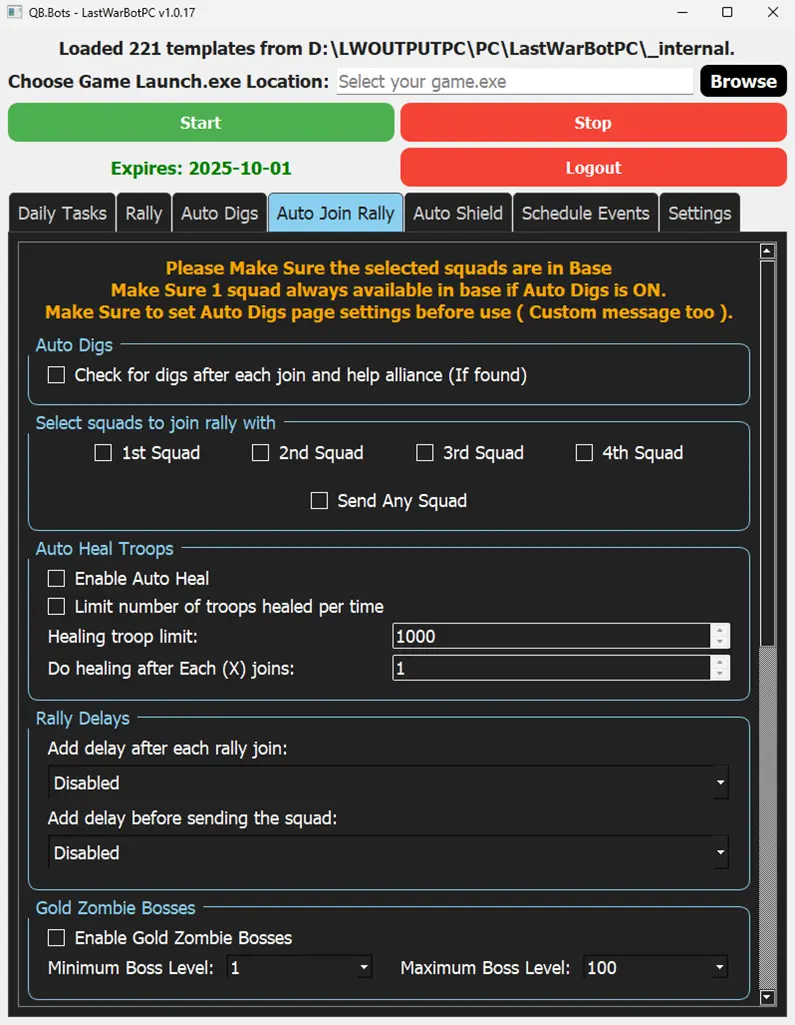
Join rallies automatically, with full control over how your squads participate.
🎯 Choose which squads to send (1–4 squads)
🩹 Enable auto-heal after specific joins
⏱️ Add a custom delay between each join
👾 Control which bosses to join (Gold Zombies, Doom Elites, Doom Walker, Sky Predator, Sandworm, Marshal’s Guard, seasonal bosses, and more)
📊 Set level ranges (min/max) for rallies you want to join
🔄 Define how long the bot should run before switching tasks
Stay active in every rally — without lifting a finger.
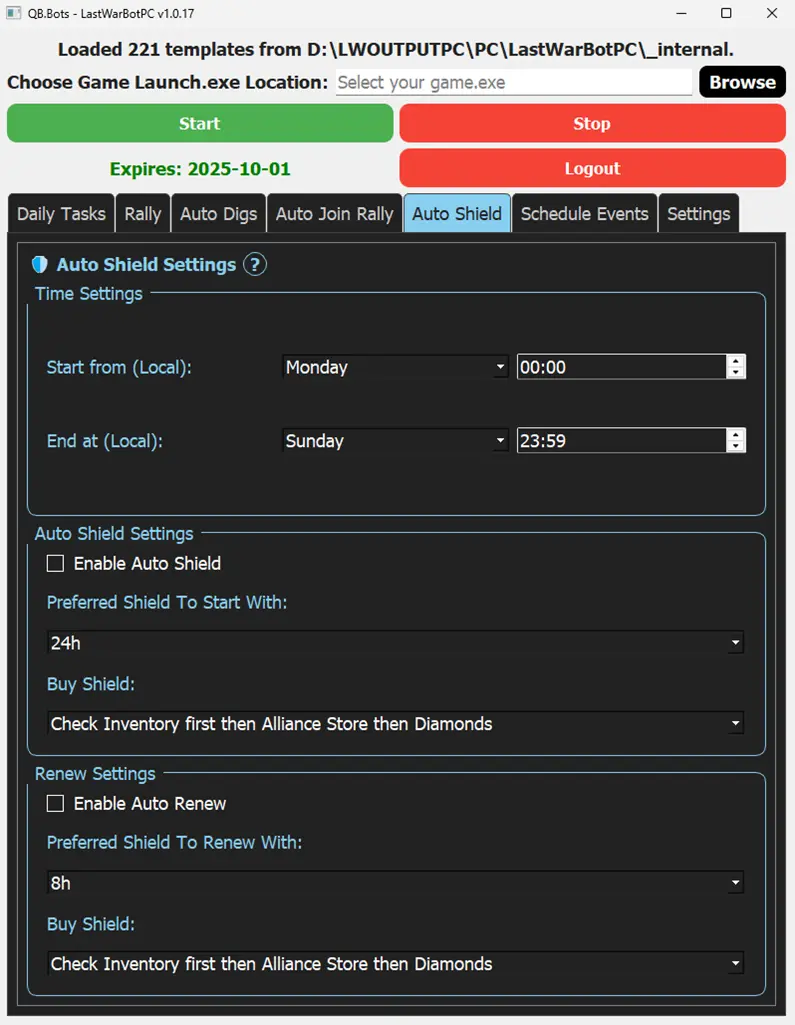
Stay protected 24/7 with smart, customizable shielding.
⏰ Set exact start and end times for shield activation
🔄 Enable auto-shield and automatic renewals
🛡️ Choose your preferred shield type for starting and renewing
🏪 Flexible purchasing: inventory, alliance store, or diamonds — bot can check all options automatically
✅ Full control over how shields are applied and renewed
Your base stays safe — even when you’re offline.
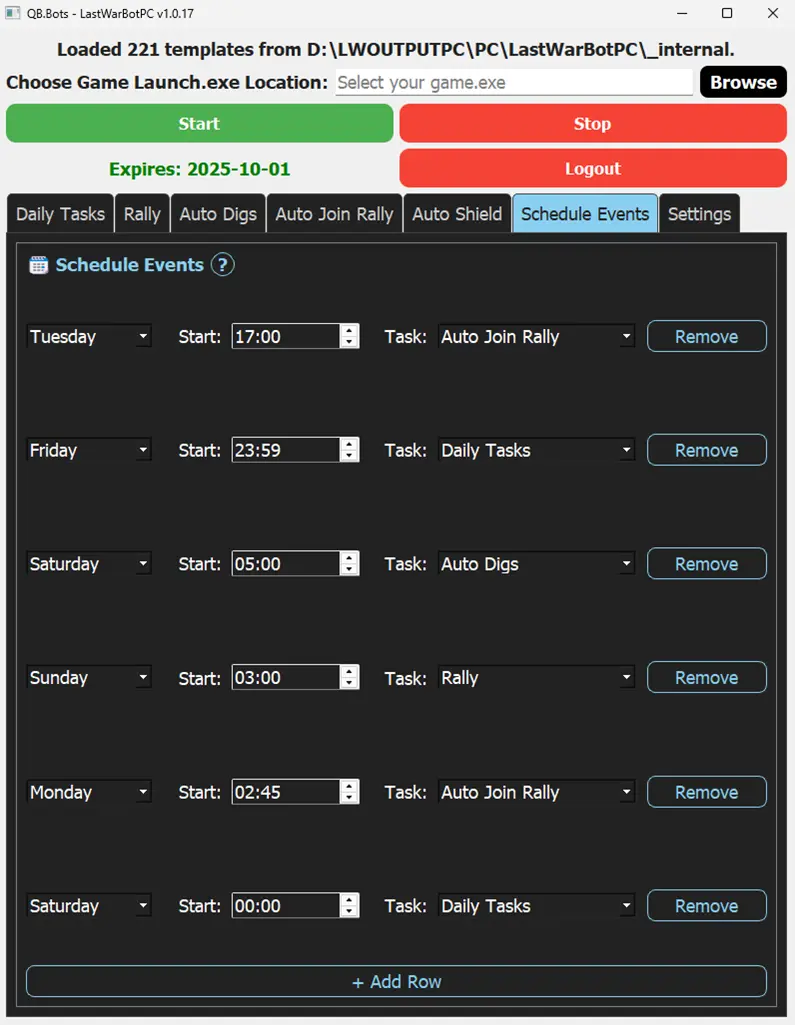
Never miss an event again — the bot runs exactly when you want it to.
🕒 Create custom schedules for any day and time
⚔️ Set rallies like Marshal’s Guard (e.g., Monday at 7:00 AM) to run automatically
📌 Schedule daily tasks at fixed times to keep rewards flowing
🔄 Flexible options — run any bot feature on your timetable
🏆 Stay covered even when you’re offline or asleep
Plan once — the bot handles every event for you.
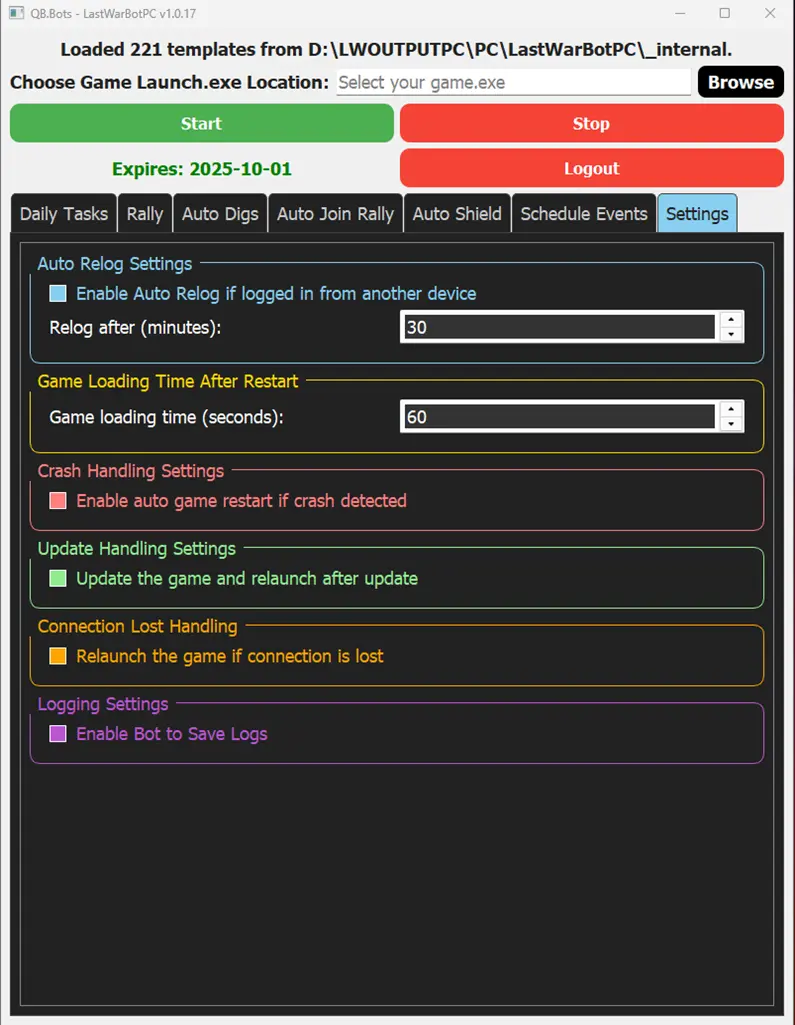
Smart controls and rock-solid stability — the bot keeps running no matter what.
🔄 Phone-friendly: If you log in from your phone, the bot will auto-reopen the game after X minutes and continue without interruption.
🕒 Handles slow PCs: Adjustable wait time ensures smooth game loading on any device.
💥 Crash recovery: Detects crashes and auto-reopens the game, resuming tasks seamlessly.
📦 Game update ready: After any update, the bot updates the game and keeps going.
🌐 Connection loss? Fixed: Automatically reconnects and continues work without stopping.
📝 Custom logs: Choose whether to save detailed logs of all actions.
Your bot won’t quit — it adapts, recovers, and keeps running until the job is done.
Our YouTube channel breaks down everything you need to know about LastWar Bot — from setup to new feature overviews.
No complicated installs, no tech headaches.
Just follow our quick step-by-step guide, choose your version, and let the bot take over.
Whether you’re running farms on Emulator or playing your main on PC, setup is quick and effortless.
Yes! Every new user gets a 24-hour free trial automatically after registering. This gives you plenty of time to set up the bot, test all the features, and see how it works with your accounts. After the trial, you’re free to subscribe if you liked the bot and want to keep it running. No payment details are needed to start your trial.
The bot is designed to be lightweight and stable. Here’s what you need:
✅ Windows PC – The bot currently supports Windows only.
✅ Two Versions Available:
PC Version – Runs directly on your Windows game client, no emulator required.
Emulator Version – Works with popular Android emulators such as LDPlayer, BlueStacks, MEmu, or Nox.
💻 Recommended Specs:
CPU: Intel i3 or better (higher is recommended for running multiple emulators)
RAM: 6 GB minimum (8 GB+ for multi-instance farming)
Storage: SSD recommended for faster game/emulator load times
Good news: The bot itself uses very little CPU/RAM and is built for long-term stability — so even on modest hardware, it can run smoothly.
You can use the bot on unlimited accounts — there’s no limit!
✅ PC Version – The game itself only allows one PC client at a time, so you can run the PC bot for one account on PC.
✅ Emulator Version – Run as many emulator instances as your PC can handle, with one bot per emulator. This is the best way to manage multiple farms or alts.
In short: use the PC bot for your main account (fastest performance), and emulator bots for extra accounts (unlimited as your hardware allows).
✅ Emulator Version – Yes! You can minimize the emulator and the bot will continue running in the background while you use your PC for other things. Just make sure your PC doesn’t go to sleep or hibernate.
❌ PC Version – No. Since the bot directly controls the PC game client, it will use your mouse and keyboard while running. That means you can’t use your PC for other tasks at the same time.
Many players use both versions together — emulators minimized for farms, and the PC bot for their main account when they’re away from the keyboard.
The bot currently supports two platforms:
✅ PC Version – Works directly with the official Windows game client (no emulator required).
✅ Emulator Version – Supports all major Android emulators, including:
LDPlayer
BlueStacks
MEmu
Make sure you configure your emulator and resolution according to our setup guide for best results.
Yes! The beta is finished and all the core features are ready to use, but development isn’t stopping here. We’re constantly improving performance, adding new features, and making the bot even smarter.
✅ Lifetime Value: The price will stay the same, even as we add more.
💬 Community Driven: We listen to player feedback on Discord and do our best to add features that are possible.
In short: the bot you use today will only get better tomorrow.
Absolutely! We’re here to make sure you get the bot running smoothly.
✅ Direct Assistance: We can connect via UltraViewer and guide you step-by-step until everything is fully set up.
✅ Personal Support: We’ll stay with you until the bot is working perfectly on your PC.
✅ Ask Anything: Whether it’s setup, settings, or best practices — we’ve got you covered.
You’re never alone — our team and community are always ready to help.